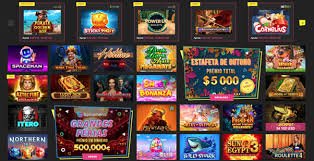
Get the bstar888 app directly on your device — Android APK or iOS. Lightweight, fast, secure, and packed with 600+ premium games in one app.
Available for Android, iOS and direct web access — all free, secure and up to date
Download the bstar888 APK file and install it directly on your Android device. Simple, fast, and no Google Play account required.
IPhone and iPad users can add bstar888 directly to their home screen via Safari as a Progressive Web App — no file download required.
Don't want to install anything? Access bstar888 directly through your web browser with no download or installation required — just log in and play.
Installing the bstar888 APK on Android is actually very straightforward — the process is no different from installing any other app. Follow the steps below and you can start playing in under 5 minutes.
Make sure you are on the official bstar888 Download page. Check the URL in your browser's address bar to verify your safety.
Tap the Android APK download button. The bstar888 APK file (42MB) will begin downloading to your device's Downloads folder.
Go to Settings → Privacy / Security → allow "Install from Unknown Sources" for downloaded files. This is standard procedure for APKs outside the Play Store.
Find the APK file in your Downloads folder and tap it to begin installation. Follow the on-screen instructions.
Installation complete! Open the bstar888 app, log in with your account or register a new one. All 600+ games are ready and waiting.
Unlike Android, iPhone users cannot install APK files directly. However, bstar888 offers an equivalent native app experience through the Progressive Web App (PWA) method, which can be easily added to your iPhone's home screen.
Make sure you are using Safari — not Chrome or Firefox. The bstar888 PWA can only be added to your home screen via Safari.
Enter bstar888.vu in your Safari address bar and wait for the page to fully load with a stable internet connection.
At the bottom of the Safari screen, tap the "Share" icon — it looks like a box with an arrow pointing up. Scroll down on the menu that appears.
Tap "Add to Home Screen". Name the icon "bstar888" and tap "Add".
The bstar888 icon now appears on your iPhone home screen just like a regular app. Tap it to log in and start playing instantly.
A fair question — can't you just access it through a web browser? Yes, you can. And that is indeed one of the options bstar888 provides. But the app experience is better in several important ways, especially if you are a regular player.
First, speed. The bstar888 app installed on your device loads games faster because some data is stored locally. You won't have to wait long each time you open the app compared to loading the website from scratch.
Second, notifications. Through the app, bstar888 can send instant alerts when there's a new promotion, a bonus credited to your account, or when a deposit has been processed. This is essential for players who don't want to miss time-limited offers.
Third, biometric login. The bstar888 app supports login via fingerprint or face recognition — something not available through a regular web browser. This makes the login process faster and more secure.
For players who game on the go — on the LRT, during lunch breaks, or while waiting — the bstar888 app experience is far more comfortable and seamless than a mobile web browser.
Once installed, the bstar888 app gives you full access to all platform features — with no reduction compared to the web version.
Designed specifically for active Malaysian players who value convenience
The bstar888 app is optimised to run smoothly on a standard 4G or WiFi connection. No buffering, no noticeable lag even during live dealer sessions.
Efficient resource management — the bstar888 app uses less data and battery compared to browsing games through a regular web browser.
Use your device's fingerprint or face recognition to log in to your bstar888 account — faster and more secure than typing your password every time.
Never miss a great offer. The bstar888 app sends push notifications when there are limited-time promotions, deposit bonuses, or special VIP rewards.
Play in portrait or landscape mode — the bstar888 app adapts automatically to deliver the best view for every game.
Always stay on the latest version of bstar888 without any action on your part. New features and security improvements are delivered silently in the background.
Always use the latest version for the best experience and updated security
| Version | Date | Platform | Size | Status | Key Changes |
|---|---|---|---|---|---|
| V3.2.1 | Jun 2026 | Android / iOS | 42 MB | Latest | Biometric support, lobby UI update, improved performance |
| V3.2.0 | Apr 2026 | Android / iOS | 40 MB | Stable | Added 50 new slots, improved promotion notifications |
| V3.1.5 | Feb 2026 | Android | 38 MB | Old | Deposit bug fix, dark mode support |
| V3.1.0 | Jan 2026 | Android | 37 MB | Old | New interface, in-app live chat, security enhancements |
| V3.0.0 | Nov 2026 | Android | 35 MB | Old | Major relaunch, black-gold design, VIP tracker |
All the most frequently asked questions about downloading and installing the bstar888 app are answered here.
Free download, install in 5 minutes, and enjoy 600+ premium games at your fingertips — anywhere, anytime.
By downloading, you agree to the Terms and Conditions bstar888. Play responsibly — read our Responsible Gaming .